The sandbox game

What is Minecraft?

Minecraft is Mojang's block-based sandbox where you explore procedurally generated worlds, gather resources, craft tools, and build anything you can imagine. On PC, the official Minecraft Launcher is how you download, update, and launch Java Edition, Bedrock on Windows, and spin-off titles from one signed-in hub.

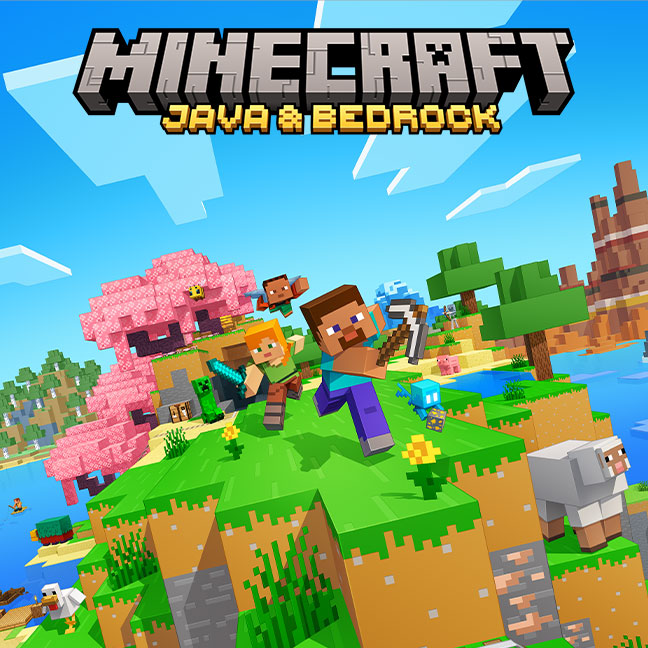
Official Minecraft Overworld promotional artwork with Steve exploring biomes Official key art
At a glance

A living world made of blocks

Every Minecraft world is built from cubes of stone, wood, water, and hundreds of other block types. Daylight brings farming, mining, and exploration. Nightfall spawns hostile mobs unless you light your shelter. There is no fixed path: some players chase the Ender Dragon, others build cities, and others automate farms with redstone.

Updates arrive regularly through Mojang, adding biomes, mobs, blocks, and mechanics. Java Edition players can also try weekly snapshots and community mods. Bedrock on Windows adds cross-play with Xbox, PlayStation, Switch, and mobile through the same Microsoft account you use in the launcher.

300M+ Players worldwide
Biomes Deserts, oceans, cherry groves
Dimensions Overworld, Nether, End
Modes Survival, Creative, Multiplayer
How you play

Core game modes

Minecraft supports different play styles in the same world. Pick a mode when you create or join a world, or switch in single-player where the edition allows it.

Survival

Gather, craft, survive

Start with nothing. Punch trees for wood, craft tools, find food, and build shelter before night. Health and hunger matter. Death drops your inventory unless you keep items in a chest or use keepInventory cheats.

Progress through the tech tree from stone to diamond and netherite. Defeat the Wither and Ender Dragon for endgame goals, or set your own targets like a fully automated base.

Creative

Unlimited building

Fly through the world with instant access to every block and item. No hunger, no hostile mob damage, and no mining grind. Ideal for megastructures, pixel art, and testing redstone contraptions before you build them in Survival.

Creative worlds are how many community showcases and server spawn builds are made. You can still share them on Realms or upload to community sites when your edition supports it.

Multiplayer

Play with others

Join friends on a LAN world, a hosted Realm, or a public server. Java Edition uses player-hosted servers with plugins and mods. Bedrock supports cross-platform play through Xbox Live and dedicated Bedrock servers.

The launcher does not replace server software, but it signs you in with the Microsoft account that owns the game and launches the correct edition so multiplayer services can verify your entitlement.

PC access

How the official launcher connects you to Minecraft

The Minecraft Launcher is Mojang's desktop app for Windows, macOS, and Linux. It is not a separate game—it downloads and runs the editions tied to your Microsoft account. Preview the interface in our launcher screenshot gallery before you install.

After you install from the Microsoft Store on Windows or from minecraft.net and launcher.mojang.com on Mac and Linux, sign in once. The left rail lists Java Edition, Minecraft for Windows (Bedrock), Dungeons, and Legends based on what you own or have through Game Pass.

What the launcher handles for you

  • Game downloads and updates — First launch pulls the latest files. Windows updates through the Store; Mac and Linux use the built-in updater.
  • Installations — Separate profiles for release versions, snapshots, and mod loaders on Java Edition.
  • Quick Play — Recent worlds and servers on the home screen for fast re-entry.
  • Account sync — Ownership, multiplayer, and Realms tie to your Microsoft account since the Mojang account migration.

Java vs Bedrock on PC

Java Edition is the original PC version with mods, snapshots, and the largest custom server ecosystem. It runs on Windows, macOS, and Linux through the official launcher.

Bedrock on PC is marketed as Minecraft for Windows. It supports cross-play and the Marketplace. It is only available on Windows 10 and 11 through the Microsoft Store launcher build—not on Mac or Linux.

Many players own both. The unified Windows launcher lets you switch editions without reinstalling a second app. See our games and editions guide for a full comparison.

Beyond the Overworld

Dimensions and spin-offs

The core sandbox spans three dimensions. Mojang also publishes action and strategy spin-offs through the same launcher on Windows.

Three dimensions

The Overworld, Nether, and End each have unique blocks, mobs, and progression. Portals and strongholds link the survival journey from first wood pickaxe to elytra flight.

Explore the dimensions guide →

Minecraft Dungeons

A co-op action RPG with procedurally generated dungeons, loot, and enchantments—no crafting tables required. Available on Windows through the launcher.

See all launcher games →

Minecraft Legends

Real-time strategy battles across the Overworld. Lead allies, build defenses, and compete in PvP. Windows only through the official launcher.

See all launcher games →

Ready to play? Download the official launcher for your operating system, then follow our install walkthrough.

Get the official launcher